Self-Hosted CMMS Software

Self-Hosted CMMS Software.
Your Data. Your Control.

MaintaraCMMS runs on infrastructure your company controls โ€” on-premises or on a private external Windows server you choose. Built to scale from a single maintenance department to multi-building manufacturing operations, while your database, backups, and access remain under your control.

At a Glance
๐Ÿ”ง
Work Orders
Full Lifecycle
๐Ÿ“ฆ
Parts & Inventory
Included
๐Ÿ—„๏ธ
Data Storage
Your Control
๐Ÿ–ฅ๏ธ
Deployment
Local or Hosted

Built for maintenance teams from a single shop to multi-building manufacturing operations ย ยทย  No per-user fees ย ยทย  Team scheduling & work requests included ย ยทย  On-premises or customer-controlled hosting

Plan work across teams, buildings, and hundreds of active work orders.

MaintaraCMMS now combines operator-friendly maintenance requests with team capacity planning, qualification-aware scheduling, and a work queue designed for larger manufacturing operations.

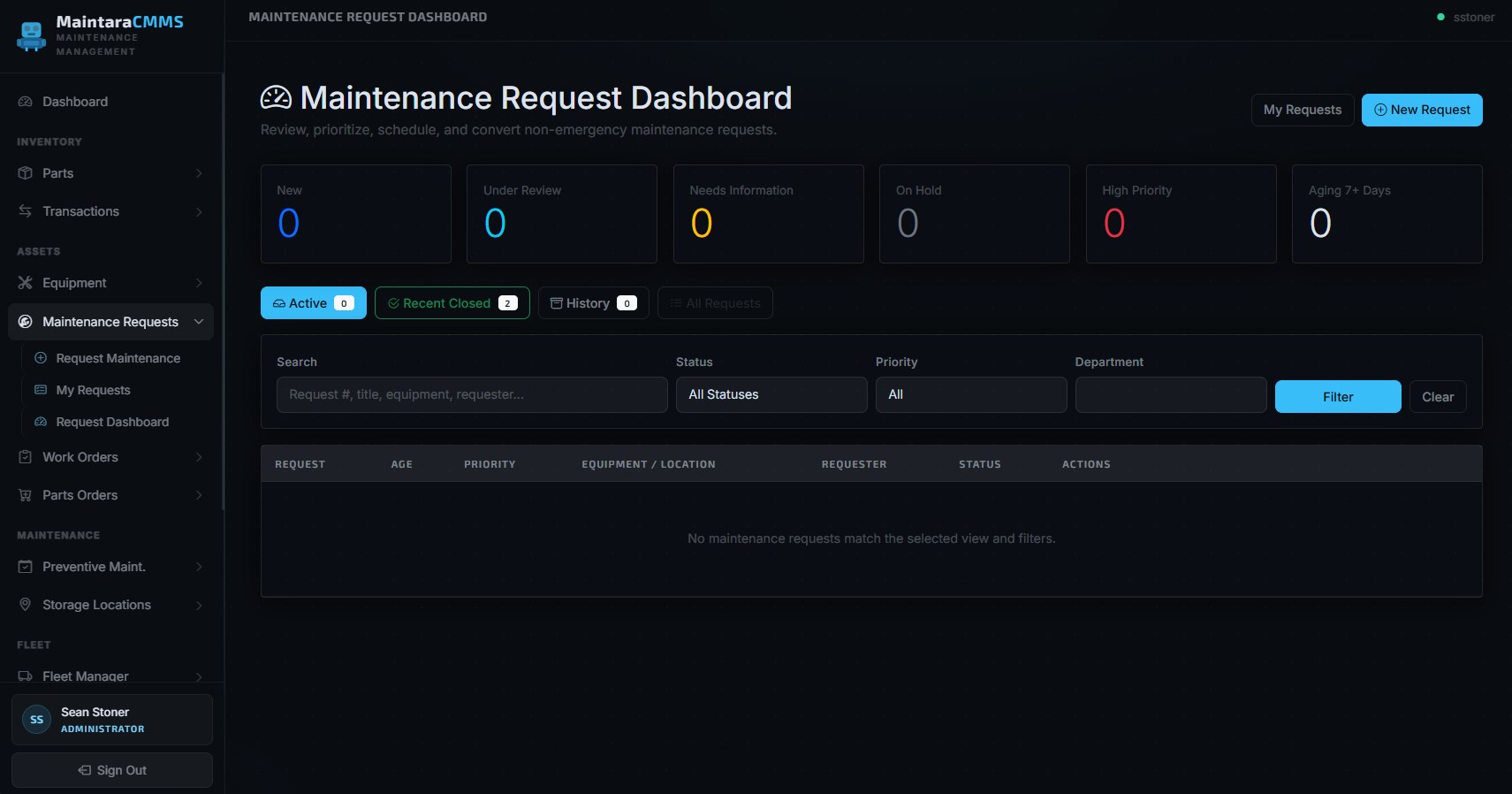
MaintaraCMMS Maintenance Request Dashboard

Maintenance Requests & Supervisor Triage

Let any authenticated user report non-emergency work, then review, prioritize, request more information, place on hold, mark duplicates, or convert requests into work orders from a supervisor queue.

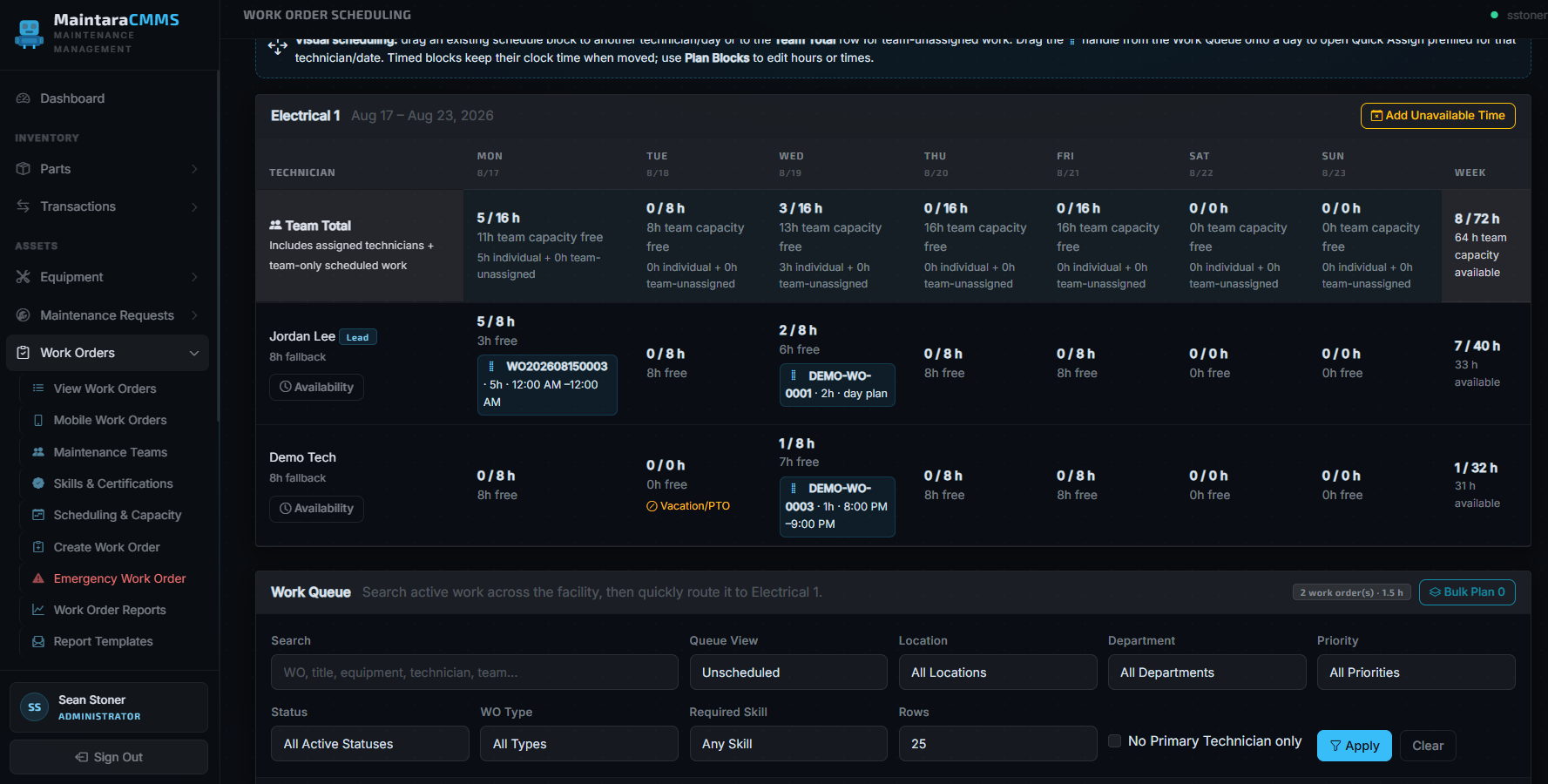
MaintaraCMMS team scheduling and capacity workspace

Team Scheduling & Capacity Enterprise

See team and technician capacity by day, account for PTO and unavailable time, drag planned work between technicians, and schedule from a filtered facility-wide Work Queue.

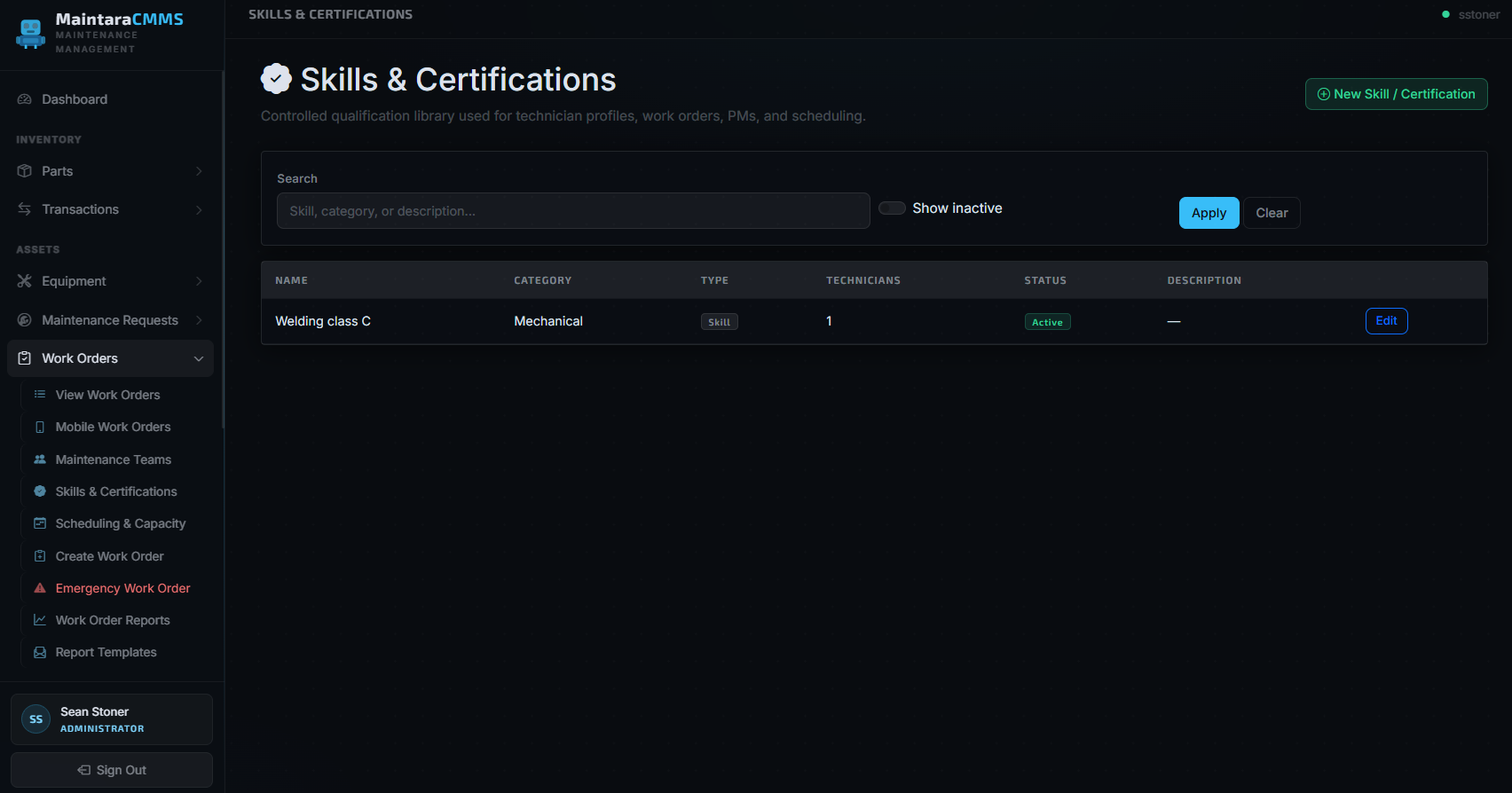
MaintaraCMMS Skills and Certifications library

Skills & Certifications Enterprise

Maintain a controlled qualification library, assign skills and certifications to technicians, require skills on work orders and PMs, and surface qualification mismatches while scheduling.

MaintaraCMMS Enterprise large-operation planning includes: team-only or individual assignment ยท flexible day plans ยท timed shutdown windows ยท multi-day plan blocks ยท quick assign and bulk planning ยท 4-week team/PM workload forecasting ยท scheduling exception alerts ยท mobile My Work/My Team queues ยท work order photos ยท equipment PDF schematics and manuals.

Vendor-hosted CMMS has hidden costs. We don't.

Many cloud CMMS vendors charge per user and keep your operational database inside their platform. MaintaraCMMS uses flat annual licensing with unlimited users, while your company controls where the application and database are hosted. Choose the Professional edition for a complete core CMMS or Enterprise for advanced large-operation planning.

โœ— Typical Cloud CMMS

๐Ÿ’ธ$45โ€“$110+ per user per month โ€” costs compound every time you hire
๐Ÿ”’Key features gated behind expensive higher-tier plans
โ˜๏ธYour operational data stored on the vendor's servers
๐Ÿค–AI features that may process or train on your maintenance data
๐Ÿ“ˆPrice hikes at renewal โ€” especially after acquisitions (Fiix โ†’ Rockwell, eMaint โ†’ Fluke)
๐ŸŒOffline when your internet goes down
๐Ÿ‘ฅProduction operators often need a paid seat just to submit a work request

โœ“ MaintaraCMMS

โœ…Flat annual licensing with unlimited users in both editions โ€” no per-seat math
โœ…Professional is a full core CMMS; Enterprise adds teams, skills, advanced scheduling, compliance, dynamic dashboards, and backlog analytics
โœ…Deploy on-premises or on a private external Windows server your company chooses and pays for
โœ…Your SQL database, backups, and access stay under your companyโ€™s control
โœ…Predictable, stable pricing you control at every renewal
โœ…Local deployments can run without internet; externally hosted deployments can be reached securely over the web or VPN
โœ…Give every operator their own account at no extra cost โ€” submit requests, view status, report issues

What does a 10-technician facility actually pay?

Annual cost comparison โ€” 10 technicians + supervisors + unlimited operators

Software Pricing Model Year 1 Year 3 Data Ownership
Maintenance Connection $110+/user/mo $13,200+ $39,600+ Vendor's cloud
eMaint (Fluke) $85/user/mo $10,200 $30,600 Vendor's cloud
Fiix (Rockwell) $75/user/mo $9,000 $27,000 Vendor's cloud
Limble CMMS $69/user/mo $8,280 $24,840 Vendor's cloud
MaintaraCMMS Professional โญ Flat facility fee $3,400 $10,200 Your infrastructure โœ“

Competitor pricing based on publicly available rates. 10-user estimate shown against MaintaraCMMS Professional. Enterprise is individually quoted. Both Maintara editions include unlimited users.

๐Ÿ‘ท

Give every operator their own account โ€” at no extra cost.

With cloud CMMS, production operators often need a paid seat just to submit a work request or check equipment status. With MaintaraCMMS, your entire production floor can have accounts. Operators can report issues, submit work requests, and view equipment status in real time โ€” without adding a dollar to your annual cost. Unlimited users means exactly that.

A complete CMMS, with Enterprise tools when operations get larger.

MaintaraCMMS Professional is a full core CMMS with individual technician assignment and basic scheduling. Enterprise builds on that foundation with team-based planning, qualifications, advanced scheduling, compliance, dynamic dashboards, and backlog analytics.

๐Ÿ”ง

Work Order Management

Operational queues, Location โ†’ Department โ†’ Equipment filtering, individual technician assignment, basic scheduling, photos, labor, parts, and full work history.

๐Ÿ“…

Preventive Maintenance

Scalable PM queues, searchable template copying, technician assignment, task checklists, and automatic scheduled work-order generation.

๐Ÿ“ฆ

Parts & Inventory

Full parts catalog with bin-level storage locations, reorder points, alternate parts, and transaction history.

๐Ÿ›’

Parts Ordering

Request, approve, track, and receive parts orders for stocked and non-stocked items with supplier management.

๐Ÿ–จ๏ธ

Zebra Label Printing

Print parts and equipment labels directly from the system using your existing Zebra printers.

๐Ÿ“Ÿ

Pager & Email Alerts

Emergency work orders trigger instant pager notifications via PagerTech. Downtime alerts go to the right shift team.

๐Ÿ“Š

Built-in Reports

Work order aging, PM compliance, technician performance, downtime impact, and parts costs โ€” all included.

๐Ÿญ

Equipment Management

Track parent/child equipment, location and department, manufacturer data, warranty and criticality, plus attach PDF schematics, manuals, and procedures.

๐Ÿ‘ฅ

Role-Based Access

Viewers, operators, technicians, supervisors, and admins each see exactly what they need.

๐Ÿ“

Maintenance Requests

Operator-friendly non-emergency requests with supervisor triage, Needs Information responses, hold/reject/duplicate actions, history, and one-click conversion to a prepopulated work order.

๐Ÿ‘ท

Maintenance Teams Enterprise

Route work to a maintenance team first, optionally assign a Primary Technician, and let team members see shared work without losing individual ownership and labor history.

๐Ÿ—“๏ธ

Scheduling & Capacity Enterprise

Team scheduling workspace, multi-day Plan Blocks, drag/drop scheduling, bulk planning, technician recommendations, capacity forecasting, scheduling exceptions, and Needs Rescheduling.

๐ŸŽ“

Skills & Certifications Enterprise

Skills library, technician qualifications, certification tracking, required/preferred skill matching, and qualification-aware recommendations.

๐Ÿ“‹

Schedule History & Compliance Enterprise

Scheduling audit history, missed schedule history, and Schedule Compliance reporting give supervisors visibility into how planned work was executed.

๐Ÿ“บ

Dynamic & TV Dashboards Enterprise

Saved dashboard profiles with Location, Department, and Team scopes plus dashboard modes and TV/kiosk displays.

๐Ÿ“ˆ

Backlog Analytics Enterprise

Dedicated Backlog Aging management dashboard and reporting for large maintenance backlogs.

๐Ÿ“ท

Photos & Equipment Documents

Attach field photos to work orders and secure PDF schematics/manuals to equipment. Technicians can reach equipment documents directly from the job on desktop or mobile.

โšก

Large-Scale Performance

Server-side filtering, sorting, counts and paging with targeted SQL Server indexes keep active queues responsive as work-order and equipment history grows.

๐Ÿงฐ

Tool Room Management

Track tools, assignments, sharpening and repair work orders, outside repair vendors, cycle targets, and return history.

๐Ÿข

Facilities Maintenance

Manage building and facility assets, facility work orders, outside contractors, vendors, and dedicated maintenance reports.

๐Ÿšœ

Fleet Manager

Manage powered warehouse equipmentโ€”including forklifts, scissor lifts, and powered pallet jacksโ€”alongside trucks and other company vehicles.
View All Features โ†’

Professional or Enterprise. Unlimited users in both.

Professional remains a full core CMMS with basic scheduling and individual technician assignment. Enterprise unlocks centrally controlled tools for teams, qualifications, advanced planning, compliance, dynamic dashboards, and backlog management.

MaintaraCMMS Enterprise
Custom Quote
unlimited users ยท quoted for your operation
  • Everything in MaintaraCMMS Professional
  • Maintenance Teams
  • Skills & Certifications
  • Advanced Scheduling & Capacity
  • Schedule History & Compliance
  • Dynamic & TV Dashboards
  • Enterprise Backlog Analytics
Request an Enterprise Quote

Enterprise is individually quoted. Final pricing is based on the licensed deployment and the scope of the organization using the Enterprise feature set. Custom development, existing-data import scripting, APIs/integrations, and optional hardware are scoped separately.

Compare Professional and Enterprise in detail โ†’
๐ŸŒ

Choose where MaintaraCMMS is hosted.

Run MaintaraCMMS on a Windows PC or server at your facility, or place it on a private external Windows server, VPS, cloud VM, or data-center environment selected by your company. For external hosting, your company selects and pays the hosting provider directly; the hosting cost is separate from the MaintaraCMMS license. In either model, your company controls the database, backups, and access.

๐Ÿ”ง

Need something we don't have? We can build it.

MaintaraCMMS is fully customizable. Whether you need a unique report, a custom workflow, an API connection to equipment or another business system, or a feature specific to your industry โ€” we can develop it for you at a transparent project rate. Custom API integrations can connect MaintaraCMMS with equipment monitoring, MES, ERP, controls, or other systems when the project calls for it. You work directly with the developers, not a support queue.

Custom reports API & equipment integrations Custom workflows Industry-specific features Quoted per project

See it in action.

A look at the actual MaintaraCMMS interface โ€” clean, fast, and built specifically for maintenance teams. Request a demo to see it live.

dashboard
Dashboard
Dashboard
Live KPI cards, quick access, PM summary
work-orders
Work Orders
Work Orders
Emergency flags, priority, full lifecycle
parts-inventory
Parts Inventory
Parts Inventory
Stock levels, reorder alerts, unit costs
equipment-management
Equipment Management
Tags, location, criticality, open WOs
parts-orders
Parts Orders
Parts Orders
Request, approve, track & receive parts
preventive-maintenance
Preventive Maintenance
Templates, auto scheduling, compliance
Request a Live Demo โ†’

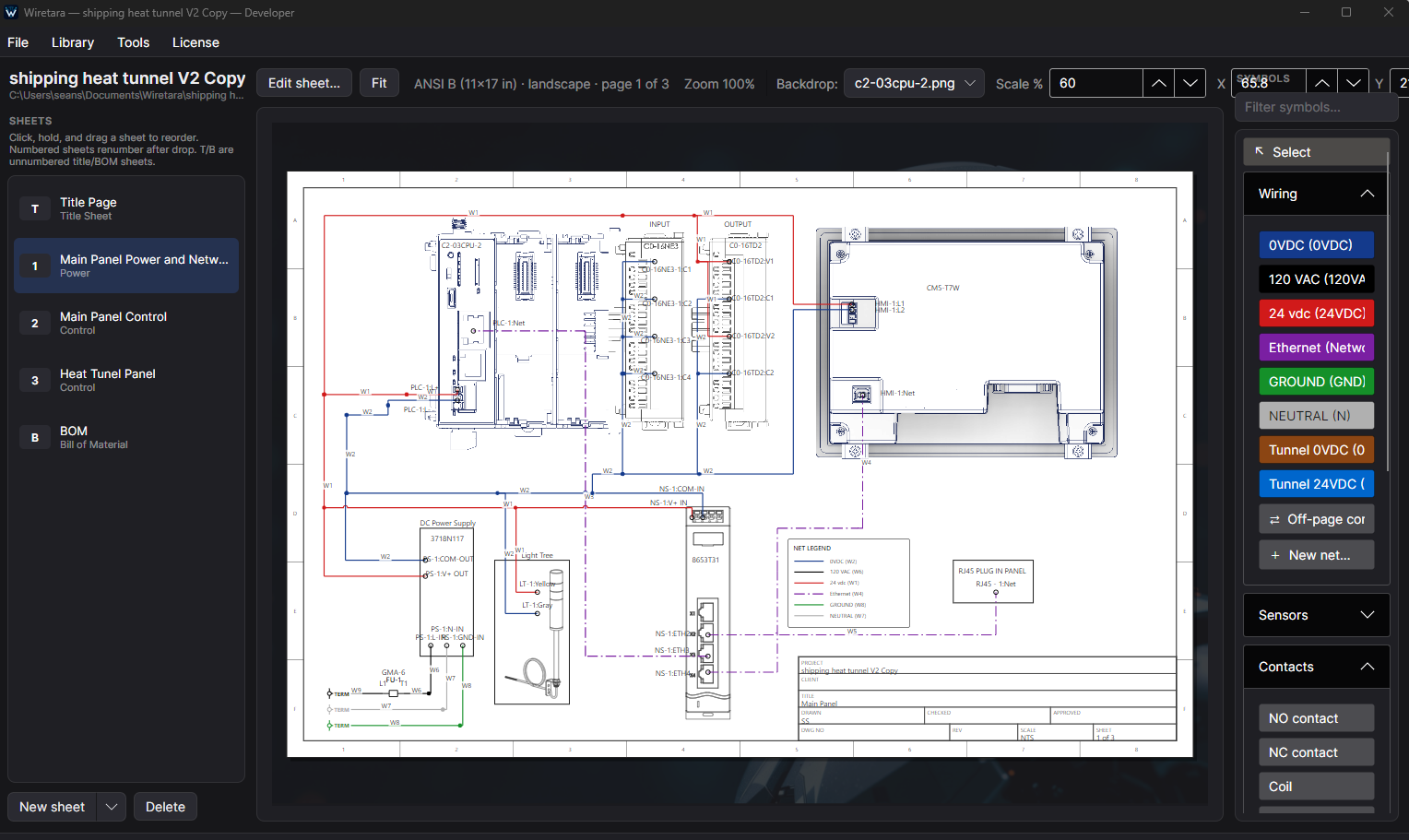
Wiretara electrical drawing software.

Wiretara is a practical desktop electrical drawing and control schematic tool for creating panel layouts, wiring diagrams, safety relay circuits, PLC wiring, terminal documentation, and project BOMs.

โšก Part-based workflow ๐Ÿงพ Automatic BOM โœ… Drawing checks ๐Ÿ—„๏ธ SQLite project files

Create parts once with symbols, terminals, pins, and manufacturer data, then reuse them across drawings. Self-contained SQLite project files make projects easy to copy, back up, and share without a separate SQL database.

Wiretara electrical drawing software showing a panel wiring diagram with symbols and wiring nets

CMMS software for the way your facility actually works.

Explore MaintaraCMMS by deployment model, maintenance workflow, or specialized module. Each page explains the capabilities in more detail.

Ready to own your maintenance data?

See MaintaraCMMS in action with a free demo tailored to your facility's workflow.

Schedule a Free Demo โ†’