Full Feature Overview

CMMS Features Built for Real Maintenance Teams

MaintaraCMMS Professional is a full core CMMS. Features marked Enterprise are centrally controlled add-ons for organizations that need teams, qualification-aware planning, advanced scheduling, compliance, dynamic dashboards, and backlog analytics.

Start with a full core CMMS, then unlock advanced planning when you need it.

Professional includes the daily CMMS workflows a maintenance department needs. Enterprise adds six centrally controlled feature groups for larger or more planning-intensive operations.

Professional stays complete: equipment/assets, work orders, emergency work, individual technician assignment, basic scheduling, PM, inventory, requests, reports, attachments, Locations/Departments, Tool Room, Facilities, Fleet Manager, and the Basic Site Overview dashboard.

Give every operator a simple way to ask for maintenance.

Non-emergency requests stay separate from the actual work-order backlog until a supervisor decides how to handle them.

  • All authenticated users can submit maintenance requests without needing work-order management permissions
  • Location → Department → optional Equipment selection keeps large asset lists manageable
  • Supervisor queues for New, Under Review, Needs Information, On Hold, Recent Closed, and History
  • Requesters can answer Needs Information comments and resubmit the request for review
  • Reject, hold, change priority, or Mark as Duplicate while preserving an audit history
  • Create a prepopulated work order from the request and retain a direct request ↔ work-order link
  • Requesters can follow the generated work order in Details-only mode without gaining maintenance actions
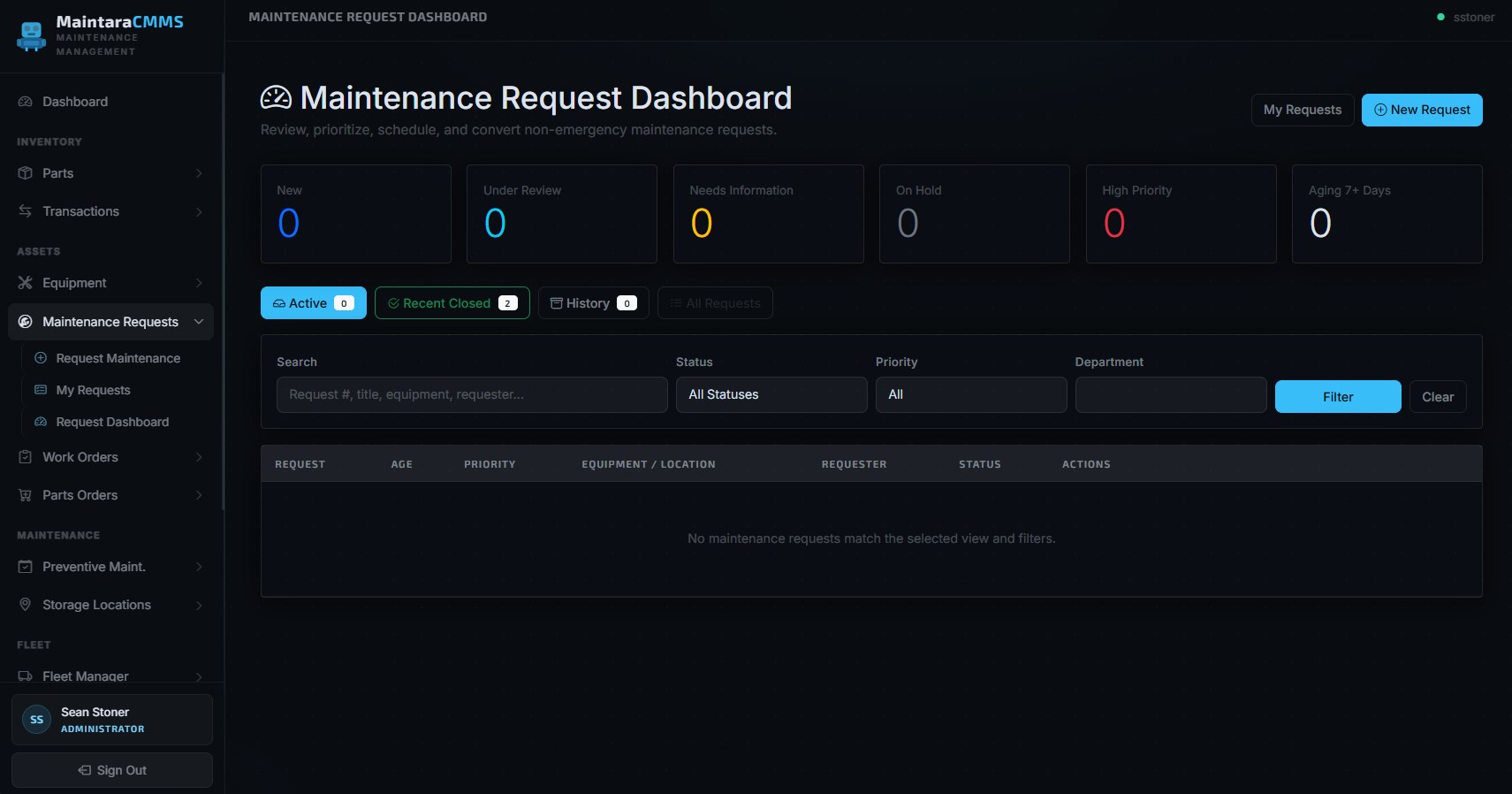
MaintaraCMMS Maintenance Request Dashboard showing request queues and filters

Plan maintenance by team, technician, capacity, and schedule.

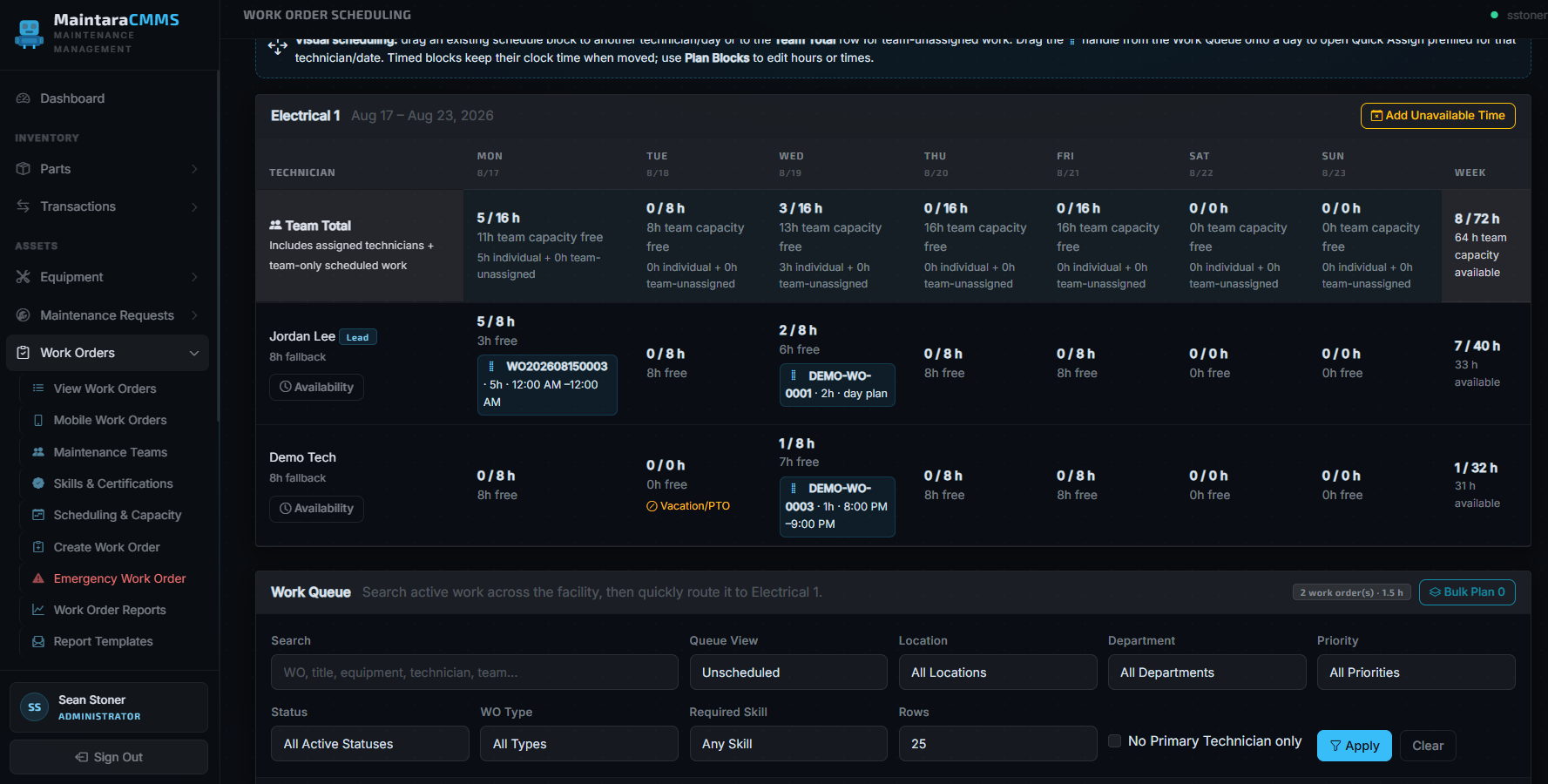
Enterprise unlocks team-based ownership and the advanced scheduling workspace while Professional retains basic work-order scheduling.

  • Maintenance Team creation and membership
  • Team-based assignment and routing
  • Team scheduling workspace
  • Multi-day Plan Blocks
  • Drag/drop scheduling
  • Bulk planning
  • Technician recommendations
  • Capacity forecasting
  • Scheduling exceptions
  • Needs Rescheduling workflow
MaintaraCMMS weekly team scheduling and capacity workspace with Work Queue

Match work to technician qualifications.

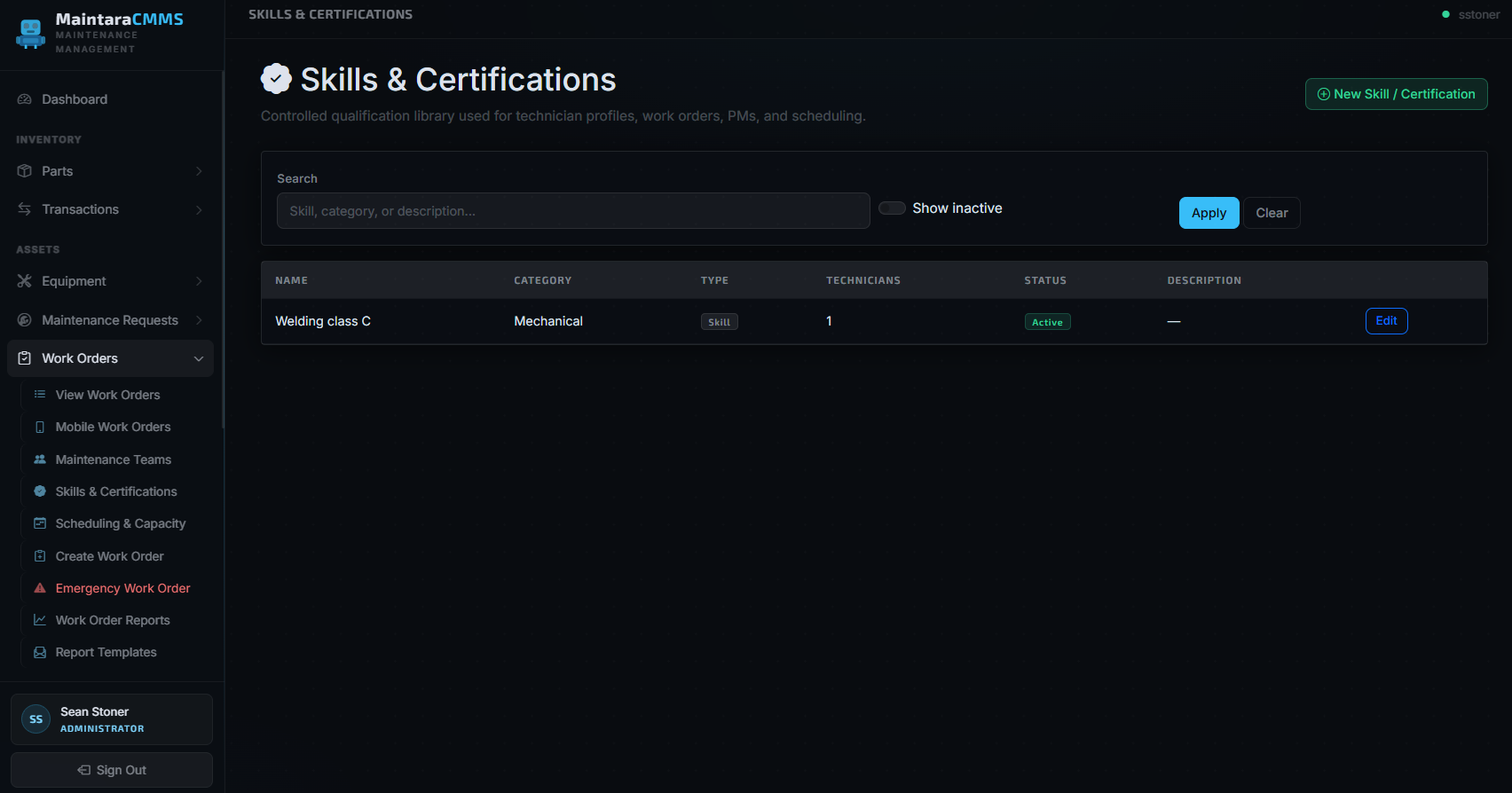
A controlled skills library gives supervisors a consistent way to manage qualifications and match work requirements to technicians.

  • Skills library
  • Technician qualifications
  • Certification tracking
  • Required and preferred skill matching
MaintaraCMMS Skills and Certifications controlled qualification library

👷 1. Maintenance Teams

Team creation/membership plus team-based assignment and routing.

🎓 2. Skills & Certifications

Skills library, technician qualifications, certification tracking, and required/preferred skill matching.

🗓️ 3. Advanced Scheduling & Capacity

Team scheduling workspace, multi-day Plan Blocks, drag/drop scheduling, bulk planning, technician recommendations, capacity forecasting, scheduling exceptions, and Needs Rescheduling.

📋 4. Schedule History & Compliance

Scheduling audit history, missed schedule history, and Schedule Compliance reporting.

📺 5. Dynamic & TV Dashboards

Saved dashboard profiles; Location, Department, and Team scopes; dashboard modes; and TV/kiosk displays.

📈 6. Enterprise Backlog Analytics

Dedicated Backlog Aging management dashboard and report.

From emergency to closure — every work order tracked.

Create and manage emergency, corrective, preventive, and repair work orders with individual technician ownership, basic scheduling, historical location context, attachments, labor, parts, and cost tracking. Enterprise adds team-based ownership and routing.

  • Emergency, corrective, PM, and repair work order types
  • Priority levels from routine to critical
  • Professional: assign work to an individual technician
  • Enterprise: assign and route work through Maintenance Teams
  • Location → Department → Equipment selection and filters for large asset populations
  • Professional scheduling queues include Unscheduled, Scheduled Today, and Next 7 Days / Upcoming alongside the core work-order queues
  • Enterprise adds team-based work views and the advanced scheduling workspace
  • Full work history and audit trail on every order
  • Multiple users can be credited on completion with individual labor hours and labor-rate cost tracking
  • Technicians can create normal work orders for issues or projects they find, automatically assigned to themselves
  • Parts used logged directly against each work order
  • Attach field photos and open equipment PDFs/schematics directly from the work order
  • Location and Department are snapshotted on the work order to preserve historical reporting after equipment moves
WO-2025-0847 – Conveyor Belt Failure
Line 3 · J. Miller
Emergency
WO-2025-0846 – Monthly PM Inspection
Compressor A · T. Ross
Preventive
WO-2025-0845 – Hydraulic Leak Repair
Press #4 · K. Nguyen
In Progress
WO-2025-0844 – Replace Drive Belt
Pump B · Completed 2h ago
Closed

Automated PM scheduling that actually works.

Build PM templates once with full task checklists and MaintaraCMMS generates work orders automatically on schedule — even overnight.

  • Professional: PM templates with detailed task checklists and individual technician assignment
  • Enterprise: team ownership plus required/preferred skill matching
  • Daily, weekly, monthly, and custom frequencies
  • Automatic overnight work order generation
  • Task-by-task completion tracking with sign-off
  • PM compliance reporting by equipment and department
  • Large-scale PM queues for overdue, today, this week, unassigned, upcoming, and inactive/history
  • Location → Department → Equipment filtering plus searchable Copy from Existing Template
  • Enterprise: PM demand can be incorporated into advanced capacity and workload planning
PM Template: Compressor Monthly
Check oil level and top off
Inspect belts for wear
Record operating pressure
Check and clean air filter
Test safety relief valve
3 of 5 tasks complete · Next due: June 1

Keep the asset record, its hierarchy, and its technical documents together.

Equipment remains the center of maintenance history while large-site location and documentation features make records practical on the plant floor.

  • Parent/child equipment hierarchy with Location and Department organization
  • Manufacturer, model, serial, warranty, installation, criticality, and status information
  • Secure PDF schematics, manuals, drawings, procedures, and datasheets stored outside the public web folder
  • Equipment documents are available directly from related Work Order Details on desktop and mobile
  • Historical work orders retain their original Location/Department even after the equipment record moves
  • Location → Department → Equipment cascading selectors keep large equipment populations manageable
DEMO-PR-001 · Hydraulic Press #1
Building 1 · Production · Parent equipment
Active
Electrical Schematic.pdf
Electrical Drawing · available from Work Orders
PDF
Hydraulic Manual.pdf
Equipment Manual · secured attachment
Manual

Know exactly what you have and where it is.

Full parts catalog with bin-level storage locations, reorder point monitoring, and a complete transaction log for every movement.

  • Part number, description, manufacturer, and supplier tracking
  • Bin-level storage location management
  • Reorder points, safety stock, and lead time tracking
  • Alternate parts linking for supply chain flexibility
  • Issue, receive, return, adjust, and transfer transactions
  • Zebra label printing for parts and locations
BRG-6205-2RS · Deep Groove Bearing
Bin A3-12 · On hand: 8
OK
BELT-B68 · V-Belt B Section
Bin B1-04 · On hand: 2 · Min: 4
Reorder
SEAL-OIL-2IN · Oil Seal 2"
Bin A2-08 · On hand: 14
OK
FILT-AIR-HVY · Heavy Duty Air Filter
Bin C1-01 · On hand: 0
Out of Stock

Tools, assignments, repairs, and sharpening in one workflow.

Keep production and maintenance tools organized separately from fixed equipment while preserving a complete assignment and service history.

  • Track tools by tag, description, department, and status
  • Check tools out to equipment or individual users and retain assignment history
  • Dedicated sharpening, repair, and preventive-maintenance work orders
  • Sent-out-for-repair status with reusable vendor tracking
  • Cycle-count targets, due indicators, and notification support
  • Expected return dates and overdue tool visibility
TL-104 · Carbide End Mill Set
Assigned to CNC-04 · Since Aug 2
Assigned
TL-212 · Punch Set
Sharpening Work Order · Vendor: Apex Tooling
Service
TL-087 · Torque Wrench
Checked out to J. Miller · Return due Aug 8
In Use

Keep building and facility work organized with production maintenance.

Manage facility assets and contractor-driven work without mixing them into your production-equipment hierarchy.

  • Dedicated facilities equipment and asset records
  • Separate facility work-order workflow and status tracking
  • Outside contractor and reusable vendor tracking
  • Track repairs, preventive work, waiting statuses, and sent-out service
  • Dedicated facilities reports and report templates
  • Quick access from the main maintenance dashboard
FAC-014 · Rooftop HVAC Unit
Quarterly PM · Building A
Preventive
FAC-031 · Dock Door 3
Repair · Contractor scheduled
In Progress
FAC-006 · Office Air Handler
Waiting for replacement motor
Waiting

Warehouse equipment and road vehicles, managed together.

Keep powered mobile equipment and company vehicles organized inside the same maintenance system as the rest of your facility.

  • Manage forklifts, scissor lifts, and powered pallet jacks
  • Track trucks, service vehicles, and other company vehicles
  • Use unit-based records to identify each fleet asset
  • Keep service and maintenance history tied to the correct unit
  • Separate mobile fleet assets from fixed production equipment
  • Access fleet records alongside your CMMS work-order history
FL-12 · Electric Forklift
Powered Warehouse Equipment · Unit FL-12
Active
SL-04 · Scissor Lift
Powered Warehouse Equipment · Unit SL-04
Service Due
PJ-21 · Powered Pallet Jack
Powered Warehouse Equipment · Unit PJ-21
Active
TR-03 · Maintenance Truck
Vehicle Fleet · Unit TR-03
In Service

Connected to the tools your facility already uses.

No middleware, no extra subscriptions — integrations are built directly into MaintaraCMMS.

📧

Email Notifications

Automatic alerts for downtime events, emergency work orders, and PM reminders routed to the right shift team.

📟

PagerTech Paging

Emergency work orders instantly page the on-call technician via your existing PagerTech radio pager infrastructure.

💬

Microsoft Teams

Send emergency work-order and extended-downtime notifications to configured Teams channels so the right shift can respond quickly.

💬

Slack

Route emergency work-order and extended-downtime alerts to configured Slack channels alongside your existing notification methods.

🖨️

Zebra Label Printers

Print barcode labels for parts, storage locations, and equipment directly from any screen — no third-party print software.

Why facilities choose MaintaraCMMS.

Architectural decisions built into how the software works — not marketing points.

🗄️ Your Data, Your Infrastructure

Maintenance history, equipment records, and parts data live on infrastructure your company controls. Keep it on-site or use a private external server you select.

🔐 No Vendor-Controlled Database

MaintaraCMMS does not require your maintenance database to live on Maintara-owned servers. Your company controls access, backups, and retention.

💰 No Per-User Pricing

Add technicians and supervisors without your bill going up. One flat annual license covers your entire team.

✅ Complete Core CMMS

Professional is not a stripped-down tier: work orders, PMs, requests, parts, reports, mobile workflows, Tool Room, Facilities, and Fleet remain part of the complete core product.

🖥️ Flexible Deployment

Run on a standard Windows PC/server at your facility or on a private external Windows server, VPS, or cloud VM. External hosting is selected and paid for by your company.

🔧 Customizable

Need a workflow that doesn't exist? We offer custom development at transparent rates — including custom API integrations with equipment, monitoring platforms, MES, ERP, controls, and other business systems. Integration projects are scoped and quoted separately, and you work with the developers directly.

📈 Designed to Grow

Server-side queues, SQL paging, targeted indexes, and scoped Location/Department filters help Professional scale cleanly; Enterprise adds team scheduling and advanced planning for more complex operations.

🧠 Planner-Friendly Workflow

Enterprise gives supervisors a dedicated planning workspace for capacity, skills, PM demand, scheduling exceptions, and team-based work.

Professional or Enterprise — without per-user pricing.

Both editions use annual licensing with unlimited users. Professional is a full core CMMS; Enterprise unlocks six advanced feature groups for team planning, qualifications, compliance, dashboards, and backlog analytics.

MaintaraCMMS Professional
Annual License + Support
$3,400
per licensed facility · per year · unlimited users
  • Complete core CMMS
  • Unlimited users and equipment
  • Work orders, PMs, requests, parts, reports & mobile
  • Tool Room, Facilities Maintenance & Fleet Manager
  • Updates and support included
Request a Professional Demo →
MaintaraCMMS Enterprise
Custom Quote
unlimited users · individually quoted
  • Everything in Professional
  • Maintenance Teams
  • Skills & Certifications
  • Advanced Scheduling & Capacity
  • Schedule History & Compliance
  • Dynamic & TV Dashboards
  • Enterprise Backlog Analytics
Discuss Enterprise →

Enterprise is individually quoted. Professional remains $3,400/year with unlimited users. Enterprise pricing is based on the licensed deployment and the scope of the Enterprise feature set required.
Custom development, data migration/import scripting, APIs/integrations, and optional computer/server systems are quoted separately.

🌐 On-premises or privately hosted

MaintaraCMMS can run inside your facility or on a private external Windows web server, VPS, cloud VM, or data-center server chosen by your company. If you use external hosting, your company pays that hosting provider directly. MaintaraCMMS licensing does not require you to host the database with us.

💡 How does this compare to cloud CMMS?

5 users on Fiix Basic
$2,700 / year
and grows every time you hire
10 users on Fiix Professional
$9,000 / year
forever, owned by Rockwell
MaintaraCMMS Professional — any user count
$3,400 / year
core CMMS, support included, your infrastructure

Explore MaintaraCMMS by workflow.

See how MaintaraCMMS handles specific maintenance and deployment needs.

Self-Hosted CMMS

Run maintenance software and SQL data on infrastructure your company controls.

Manufacturing CMMS

Coordinate requests, work orders, PMs, parts, Locations/Departments, and — with Enterprise — team-based planning.

Maintenance Scheduling

Use Professional basic scheduling or Enterprise team scheduling, capacity planning, and qualification matching.

Tool Room Management

Track tools, assignments, cycle counts, repair, sharpening, vendors, and history.

Facilities Maintenance

Manage facility assets, PMs, work orders, vendors, and reports alongside production maintenance.

CMMS API & Integrations

Connect equipment and business systems through separately scoped custom integration projects.

See it running in your environment.

We'll demo MaintaraCMMS against your actual facility's workflow — not a generic slide deck.

Request a Free Demo →